


BERMAD Connect
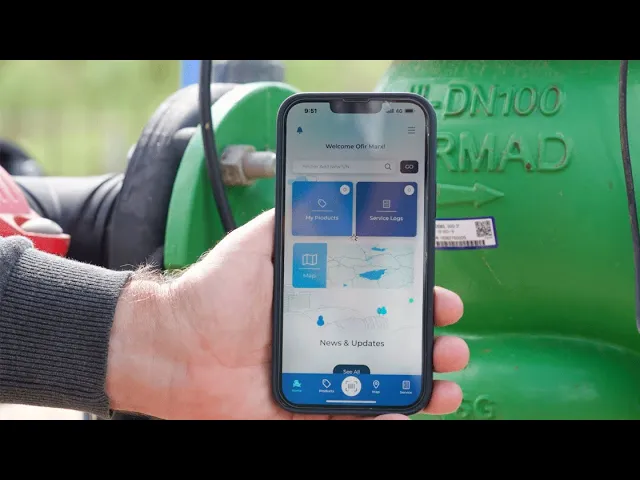
BERMAD Connect is an intuitive app that enables users to scan or enter the serial number of a BERMAD product, and access all the information they need to easily install, operate, and maintain this product – from wherever they are.
What is BERMAD Connect?
BERMAD Connect is an intuitive app that enables users to scan or enter the serial number of a BERMAD product, and access all the information they need to easily install, operate, and maintain this product – from wherever they are.
This information includes product information, such as model, end connections, and PN rating; a link to the product webpage; the exact product location; information for product installation, operation, and maintenance; a service log for each product; and a channel for connecting directly to the BERMAD support team.
The BERMAD Connect app makes the lives of end users so much easier by streamlining water control solution management and enabling them to keep track of every aspect of their BERMAD solutions – on the spot, and from wherever they are.


Advanced Field Tools – Now Integrated into BERMAD Connect
BERMAD Connect continues to evolve as your all-in-one platform for managing, operating, and maintaining water control solutions in the field. In addition to instant access to product data, manuals, and service logs, the app now includes two powerful engineering tools – previously available in the BERMAD Pocket Guide – fully integrated into the app experience.
Control Loops Guide
The Control Loops Guide provides a visual and intuitive way to understand and apply BERMAD hydraulic control valve configurations across a wide range of waterworks and irrigation applications. Whether you are working with pressure reducing valves, flow control valves, or level control systems, the guide helps you:
- Identify the correct control loop configuration for your application
- Understand how each pilot system and component interacts
- Access clear, step-by-step schematic diagrams for installation and troubleshooting
- Navigate between application categories such as irrigation heads, infield systems, and main networks
Users can easily access the Control Loops Guide from the main menu and mark frequently used configurations as Favorites for quick access in the field.
Previously part of the BERMAD Pocket Guide, this feature is now seamlessly embedded within BERMAD Connect – ensuring that critical hydraulic knowledge is always available alongside your specific valve data.

Unit Conversion Calculator
The Unit Conversion Calculator is designed to support accurate and efficient field work by enabling quick conversions between commonly used engineering units. Ideal for engineers, technicians, and operators working across different standards, the tool allows you to:
- Convert between pressure units (e.g., bar, kPa, psi, water head)
- Switch between flow, length, volume, and weight units
- Perform fast calculations directly on-site, reducing errors and saving time
Accessible directly from the app menu, the calculator provides a simple and user-friendly interface tailored for real-world field conditions.
Like the Control Loops Guide, this tool was originally part of the BERMAD Pocket Guide and is now fully integrated into BERMAD Connect—bringing essential calculation capabilities into your daily workflow.

Everything You Need – In One App
By integrating these tools into BERMAD Connect, users benefit from a unified platform that combines:
- Product-specific data and documentation
- Operational and maintenance tools
- Engineering knowledge and calculations
All accessible anytime, anywhere—helping streamline installation, improve accuracy, and support better decision-making in water control systems.
BERMAD Connect Quick Start Guide

How Does it Work?
All you need to do to get started is download and install the BERMAD Connect App on your phone, sign up as a new user, and activate your account via the activation email you receive. Once you have the app up and ready, you can enter the serial number or scan the QR code on your BERMAD equipment and click the Update Location button for each solution to add its location to the service. You can then use BERMAD Connect to easily access all the information you need to install, operate, and maintain your BERMAD equipment from wherever you are.
This information includes product information, such as model, end connections, and PN rating; a link to the product webpage; the exact product location; information for product installation, operation, and maintenance; a service log for each product; and a channel for connecting directly to the BERMAD support team. BERMAD keeps all your data safe and secure in the cloud, helps you save a lot of time, enables you to stay on top of everything, and most importantly – comes at no extra cost to you!

Everything You Need to Know About BERMAD CONNECT
Frequently asked questions about the app
Couldn’t find what you were looking for? Contact Us!
